“NYC Covid Infections By Zip Code With Python”
In my last post I created a CLI tool to display NYC Covid-19 test results by Zip code using Perl, my favorite language for the moment. I would like to do the same using Python. Purely as a an excuse to learn Python. This will download the same data, from the NYC health department’s GitHub page , and create a JSON file which I can use as a very basic database for later analysis.
Input NYC Data
"MODZCTA","Positive","Total","zcta_cum.perc_pos" NA,1558,1862,83.67 "10001",309,861,35.89 "10002",870,2033,42.79 "10003",396,1228,32.25 "10004",27,85,31.76 "10005",54,206,26.21 "10006",21,91,23.08 "10007",49,204,24.02 "10009",607,1745,34.79Python Script to Download the City Covid 19 Testing Data
from __future___ import print_functionimport datetime, json, requests, os, re, sys
RAW_ZCTA_DATA_LINK = 'https://raw.githubusercontent.com/nychealth/coronavirus-data/master/tests-by-zcta.csv'ALL_ZCTA_DATA_CSV = 'all_zcta_data.csv'
def get_today_str():    today = datetime.date.today().strftime("%Y%m%d")    return today
def find_bin():    this_bin = os.path.abspath(os.path.dirname(__file__))    return this_bin
def create_dir_if_not_exists(base_dir, dir_name):    the_dir = base_dir + '/' + dir_name    if not os.path.isdir(the_dir):    os.mkdir(the_dir)    return the_dir
def create*db_dirs():    this_bin = find_bin()    db_dir = create_dir_if_not_exists(this_bin, 'db')    today_str = get_today_str()    year_month = today_str[0:4] + '*' + today_str[4:6];    year_month_dir = create_dir_if_not_exists(db_dir, year_month)    return year_month_dir
def get_covid_test_data_text():    r = requests.get(RAW_ZCTA_DATA_LINK)    print("Resp: " + str(r.status_code))    return r.text
def create_list_of_test_data():    test_vals = []    covid_text = get_covid_test_data_text()    for l in covid_text.splitlines():        lvals = re.split('\s*,\s*', l )        if lvals[0] == '"MODZCTA"':            continue        zip_dic = { 'zip' : lvals[0], 'positive': lvals[1], 'total_tested': lvals[2], 'cumulative_percent_of_those_tested': lvals[3]}        test_vals.append(zip_dic)    return test_vals
def write_todays_test_data_to_file():    year_month_dir = create_db_dirs()    test_data = create_list_of_test_data()    print(test_data[0])    today_str = get_today_str()    todays_file = year_month_dir + '/' + today_str + '\_tests_by_ztca.json'    out_file = open ( todays_file, 'w')    json.dump(test_data, out_file, indent=2)    print("Created todays ZTCA tests file,{todays_file}".format(\*\*locals()))    out_file.close()
write_todays_test_data_to_file()
Explanation of the Data Fetching Script
Just a few snippets of interesting code here.
To get todays date as a string in the format yyyymmdd, example, 20200401, I used the datetime module.
today = datetime.date.today().strftime("%Y%m%d")`Python has an interesting syntax for slicing strings or lists up into pieces.
year_month = today_str[0:4] + '_' + today_str[4:6]The [0:4] gets the first four characters of the string. The [4:6] grabs the subsequent 2 characters of the string. These are combined to create a sub-directory name like 2020_05
I use the os path library to get the directory location of this script. It’s similar to the Find::Bin in Perl.
this_bin = os.path.abspath(os.path.dirname(__file__))After downloading the current raw test data from the NYC department of health GitHub page, using the requests library.
r = requests.get(RAW_ZCTA_DATA_LINK) print("Resp: " + str(r.status_code)) return r.textIt is then split up using the re module, which is Pythons rather awkward way of regular expression matching.
lvals = re.split('\s*,\s*', l)
"10003",396,1228,32.25Which can then be inserted to a python Dictionary structure like this,
{ "zip": "10003", "yyyymmdd": "20200503", "positive": "396", "total_tested": "1228", "cumulative_percent_of_those_tested": "32.25"},{ "zip": "10003", "yyyymmdd": "20200503", "positive": "396", "total_tested": "1228", "cumulative_percent_of_those_tested": "32.25"}This is appended to a list of similar Dictionaries.
todays_file = year_month_dir + '/' + today_str + '_tests_by_ztca.json'I’ve since learned that there’s a better way to do this using the os path library, which I’ll use the next time.
To print the data in JSON format to a file, Python provides the aptly named json library.
json.dump(test_data, out_file, indent=2)The indent=2, isn’t necessary, but it makes the output more readable.
test_data = json.load(in_file)Read more about the JSON library here, Python JSON docs.
Adding More Functionality to the Script
I’ll add more functionality by adding location details for each zip code where the tests were conducted, using a NYC Zip Code database file.
import datetimeimport jsonimport requestsimport osimport reimport sys
RAW_ZCTA_DATA_LINK = 'https://raw.githubusercontent.com/nychealth/coronavirus-data/master/tests-by-zcta.csv'ALL_ZCTA_DATA_CSV = 'all_zcta_data.csv'BIN_DIR = os.path.abspath(os.path.dirname(**file**))DB_DIR = os.path.join(BIN_DIR, '..', 'db')NA_ZIP = "88888"THIS_SCRIPT = sys.argv[0]ZIP_DB = os.path.join(DB_DIR, 'zip_db.json')......def get_zip_data():z_db = open(ZIP_DB, 'r')zip_data = json.load(z_db)z_db.close()return zip_data
def get_filler_location_rec(bad_zip=NA_ZIP):    label = 'Unknown-' + bad_zip    return {        'zip': bad_zip,        'borough': label,        'city': label,        'district': label,        'county': label    }
# Zip: 11697# Data: {"borough": "Queens", "city": "Breezy Point", "county": "Queens", "district": "Rockaways"}# {#     "zip": "11697",#     "positive": "82",#     "total_tested": "193",#     "cumulative_percent_of_those_tested": "42.49"# }
def merge_zip_data():    all_zip_data = get_zip_data()    todays_test_data = get_todays_test_data()    merged_data = []    for td in todays_test_data:        if td['zip'] == 'MODZCTA':            continue        zip_data = all_zip_data.get(td['zip'])        if not zip_data:            print("NO Zip data for " + td['zip'])            zip_data = get_filler_location_rec(td['zip'])        zip_data.update(td.copy())        merged_data.append(zip_data)    return merged_data
def sort_test_data_func(zip_data):    return int(zip_data['positive'])
def write_todays_data_to_csv():    merged_test_data = merge_zip_data()    csv_file = get_todays_csv_file()    col_headers = [            'Zip',            'Date',            'City',            'District',            'Borough',            'Total Tested',            'Positive',            '% of Tested']    cols = [            'zip',            'yyyymmdd',            'city',            'district',            'borough',            'total_tested',            'positive',            'cumulative_percent_of_those_tested']    merged_test_data_sorted = sorted( merged_test_data, key=sort_test_data_func, reverse=True)    # merged_test_data_sorted = merged_test_data    csv_fh = open(csv_file, 'w')    csvwriter = csv.DictWriter(csv_fh, fieldnames=cols, restval='')    csvwriter.writeheader()    for zip_test_data in merged_test_data_sorted:        ztd = {x: zip_test_data[x] for x in cols}        csvwriter.writerow(ztd)    csv_fh.close()    print("Finished writing to the " + csv_file)
The first function, get_zip_data reads in the ZipCode data using Pythons json library.
[ { "zip": "88888", "yyyymmdd": "20200504", "positive": "1607", "total_tested": "1917", "cumulative_percent_of_those_tested": "83.83" }, { "zip": "10001", "yyyymmdd": "20200504", "positive": "311", "total_tested": "878", "cumulative_percent_of_those_tested": "35.42" }, ...The get_filler_location_rec function adds default data in cases where the NYC department of health doesn’t provide the ZipCode for the test set.
The test data and the ZipCode information is then merged to add more locations details to the test results. It loops through the test data results.
zip_data = all_zip_data.get(td['zip']) ... zip_data.update(td.copy())It gets a dictionary of the location information for the zip code, updates that with a copy of the test data for that location.
merged_data.append(zip_data)Writing out the merged data to a CSV file can be done using the csv library. I’m sorting it in order of the number of positive cases descending, using the sorted function and applying my sort criteria with
def sort_test_data_func(zip_data): return int(zip_data['positive']) ... ... merged_test_data_sorted = sorted( merged_test_data, key=sort_test_data_func, reverse=True)The resulting CSV file was double spaced. So, after looking at the ‘csv’ library docs I changed the file open statement from:
# From:csv_fh = open(csv_file, 'w')# To:csv_fh = open(csv_file, 'w', newline = '')You’ll also notice, (if you haven’t fallen asleep already) that I used the csv.DictWriter (I’d love to know who comes up the naming in Python), as I’m writing a list of Dictionaries to the CSV file. The DictWriter knows which dictionary fields to write to the CSV file using the fieldnames=cols attribute.
The CSV file looks something like this.
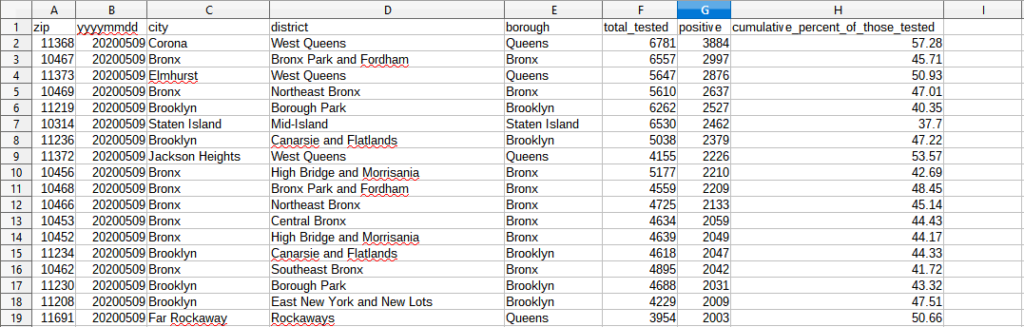
NYC Covid-19 testing data CSV
20200509_tests_by_ztca
Download The CSV File
And that’s all I have to say about that.